πŸ‡΅πŸ‡­ 100% Free β€’ Open-Source β€’ Walang Internet Needed

The Smart Offline POS & Utang Ledger for Filipino Sari-Sari Stores

Scan barcodes, record fast sales, manage customer credit books, and track daily profits with zero internet and zero monthly fees.

βœ“ Latest Version: v1.0.1 βœ“ Requires Android 8.0+ βœ“ Size: ~25 MB βœ“ 100% Libre / No Subscriptions
Live App Preview
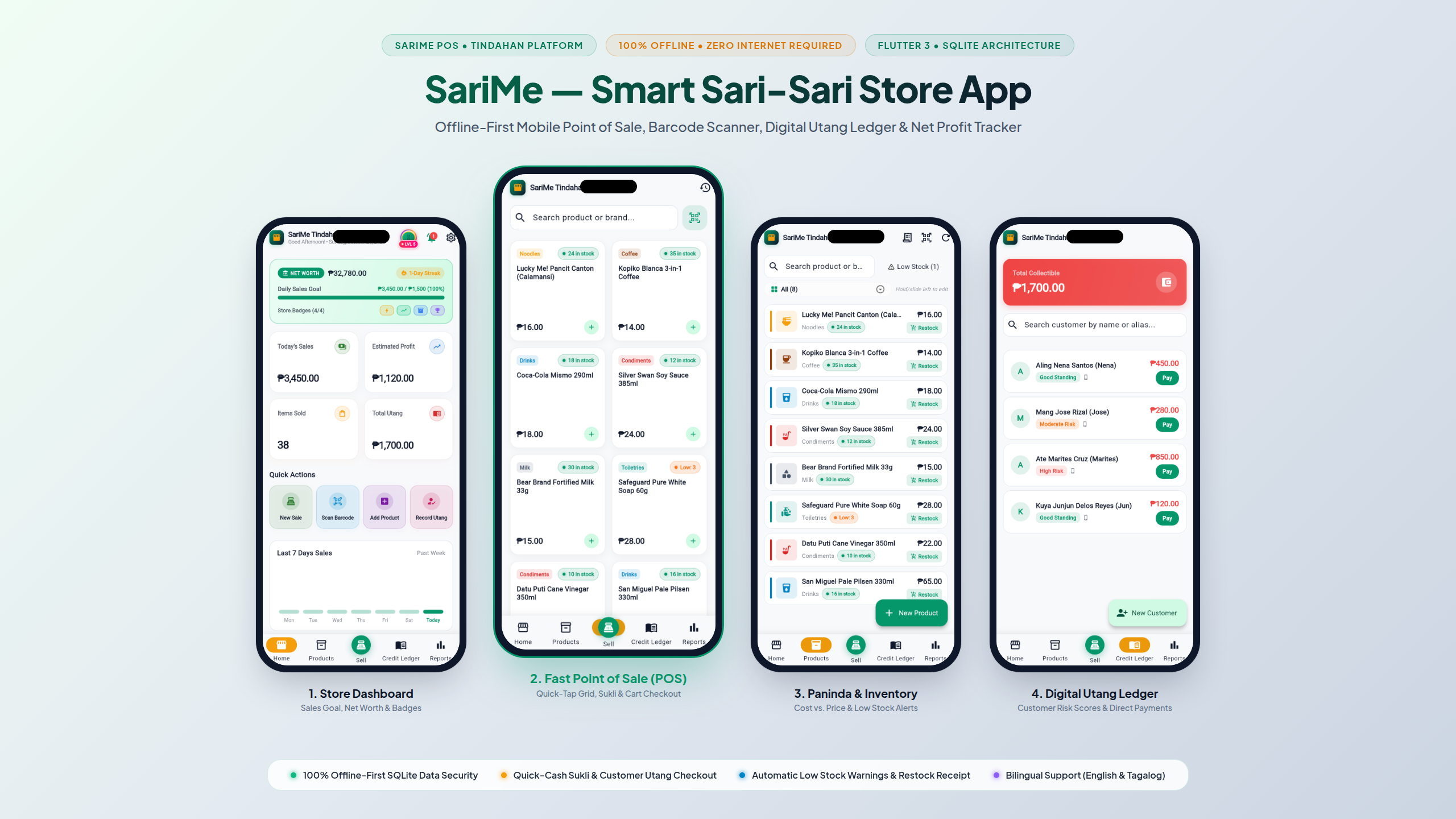
SariMe App Interface Showcase - Store Dashboard, Fast POS, Paninda Inventory, and Digital Utang Ledger
Click to enlarge in 2560 Γ— 1440 HD
1
Store Dashboard Daily Sales, Streak & Net Worth
2
Fast POS & Scanner Quick-Tap Grid & Sukli Calculator
3
Paninda & Inventory Cost vs. Price & Stock Alerts
4
Digital Utang Ledger Customer Scores & Partial Payments
⚑
100% Offline
Zero internet or mobile data needed
πŸ”’
Private & Secure
All records stay strictly on your phone
πŸ‡΅πŸ‡­
Para sa Tindahan
Built specifically for Filipino culture
🎁
Libre Habangbuhay
No ads, no monthly fees, no hidden costs

Everything Your Sari-Sari Store Needs

Built to replace old notebooks, manual calculators, and lost utang records.

πŸ›’

Fast POS & Barcode Scanner

Point your phone camera to scan barcodes instantly on instant noodles, chips, and drinks, or tap quick-cash buttons for lightning-fast checkout.

πŸ“’

Digital Utang Credit Ledger

Say goodbye to torn paper notebooks! Keep accurate customer credit balances, record partial payments (hulog), and see who owes what at a single glance.

πŸ“ˆ

Daily Kita & Sales Goals

See exactly how much revenue and net profit you earned today. Level up your store from 'Starter Storekeeper' to 'Sari-Sari Legend' as you hit sales goals!

πŸ”

Owner PIN Lock Protection

Let family members or store bantay ring up sales without exposing your supplier cost prices or total daily profit. Your profit margins stay 100% confidential.

πŸ“±

Android Home Screen Widget

Glance at your current day sales, target goal progress, and top-selling items right on your Android phone home screen without needing to launch the app.

πŸ—£οΈ

Tagalog & English Bilingual

Switch seamlessly between conversational Tagalog and English across every screen, button, and report. Built comfortably for local store owners.

πŸ’΅

GCash & Maya E-Wallet Hub

Record Cash In & Cash Out with automatic sari-sari store patong fee calculations, launch GCash/Maya apps with customer phone numbers pre-copied, and send formatted SMS receipts.

How to Install SariMe on Android

Since SariMe is 100% free and open-source, you can install the APK directly without needing a Google Play account.

1

Download APK

Tap the 'Download Free Android APK' button on this page. Your browser (Chrome) will begin downloading the SariMe-v1.0.1.apk file.

2

Open File

Once downloaded, pull down your notification tray or go to your phone's 'Downloads' folder and tap the downloaded file.

3

Allow Unknown Apps

If Android shows a security prompt ('For your security, your phone is not allowed to install unknown apps'), tap 'Settings' and toggle 'Allow from this source'.

4

Tap Install & Open

Tap 'Install'. In just a few seconds, SariMe will be installed on your phone. Open it and start managing your store offline!

Android Security Warnings (Normal & Safe)

Because SariMe is distributed directly without the Google Play Store, Android and Chrome display standard safety prompts:

  • Chrome "File might be harmful": Tap "Download anyway". Chrome flags all direct APK downloads by default.
  • Play Protect "App scan recommended": Tap "Install without scanning" (or tap "Scan app"). SariMe is 100% offline, open-source, and contains zero trackers.

Frequently Asked Questions

Kailangan ba ng internet para magamit ang SariMe?
Hindi! Ang SariMe ay 100% offline-first. Ang pagbebenta, pag-scan ng barcode gamit ang camera, paglilista ng utang, at mga ulat ng kita ay gumagana kahit walang internet, Wi-Fi, o mobile data.
Libre ba talaga ito? May bayad ba bawat buwan?
Walang anumang bayad! 100% libre ang SariMe, walang subscription, walang ads, at bukas ang source code sa GitHub para sa komunidad ng mga magtitindang Pilipino.
Paano ako makakakuha ng mga bagong update sa hinaharap?
Napakadali! Sa loob ng SariMe, pumunta sa 'Settings' at pindutin ang 'Check for Updates'. O kaya ay bisitahin muli ang website na ito para i-download ang bagong APK.
Mawawala ba ang aking mga paninda at listahan ng utang kapag nag-update ako?
Hindi! Naka-save ang iyong SQLite database sa protektadong storage ng iyong telepono. Kapag nag-install ka ng bagong APK update, mananatiling buo at kumpleto ang lahat ng iyong paninda, benta, at utang records.

Ready to modernize your sari-sari store?

Download the free APK now and start managing sales and utang like a pro.

I-download ang SariMe APK (Libre)
Meet the Developer

Joshua Sierra

Filipino Software Developer building practical, offline-first digital tools to empower neighborhood sari-sari store owners. Have feedback, feature ideas, or questions? Connect with me below!